Cli
The run() function accepts an ArgumentParser directly, so you can migrate an existing argparse-based program with minimal effort. Be aware of a few caveats for advanced CLI patterns.
mininterface.cli
Useful objects meaningful for CLI handling only.
Positional = Positional
Annotate the dataclass field with Positional to make it behave like a positional argument in the CLI.
from dataclasses import dataclass
from mininterface import run
from mininterface.cli import Positional

@dataclass
class Env:
    flag1: Positional[str] = "default"
    flag2: str = "flag"

run(Env)
$ ./program.py --help
usage: program.py [-h] [-v] [--flag2 STR] [STR]

╭─ positional arguments ───────────────────────────────────────────────╮
│ [STR]                flag1 (default: default)                        │
╰──────────────────────────────────────────────────────────────────────╯
╭─ options ────────────────────────────────────────────────────────────╮
│ -h, --help           show this help message and exit                 │
│ -v, --verbose        Verbosity level. Can be used twice to increase. │
│ --flag2 STR          (default: flag)                                 │
╰──────────────────────────────────────────────────────────────────────╯
This is just a link from tyro.conf package which comes bundled. You will find much more useful features there.
https://brentyi.github.io/tyro/api/tyro/conf/#tyro.conf.Positional
Command
The Command is automatically run when instantiated.
It adapts the init and run methods.
It receives attributes self.facet and self.interface.
Put list of Commands to the mininterface.run and divide your application into different sections. Alternative to argparse subcommands.
Commands might inherit from the same parent to share the common attributes.
Use a plain dataclass Union to group config/data under subcommands (you read the chosen one
off .env and act on it yourself). Subclass Command and implement run() when each subcommand
has behavior you want dispatched automatically.
Instance lifecycle
- init / post_init — may run more than once during CLI/form parsing.
self.facetandself.interfaceare NOT available yet. Keep construction cheap and side-effect-free. - The runtime injects
self.facetandself.interface, then callsinit()once — do real setup here (you may useself.facet). - (interactive only) the form is shown.
run()is called automatically. RaiseValidationFailto re-show the form.
SubcommandPlaceholder class
The special class SubcommandPlaceholder let the user to choose the subcommands via UI,
while still benefiting from the default CLI arguments.
The CLI behaviour:
./program.py-> no subcommand given: starts the UI to choose one./program.py subcommand --flag->SubcommandPlaceholderlets you pass shared--flags and still choose the concrete subcommand in the UI./program.py subcommand1 --flag-> runssubcommand1directly./program.py subcommand1-> runssubcommand1directly. If all its fields are defaulted, it runs headless with no prompt (cron-safe). If a required field is missing, then withask_for_missing=True(default) a form asks for it; non-interactively it exits like argparse with "the following arguments are required: ...".
An example of Command usage
from dataclasses import dataclass, field
from pathlib import Path
from mininterface import run
from mininterface.exceptions import ValidationFail
from mininterface.cli import Command, SubcommandPlaceholder
from tyro.conf import Positional


@dataclass
class SharedArgs(Command):
    common: int
    files: Positional[list[Path]] = field(default_factory=list)

    def init(self):
        self.internal = "value"


@dataclass
class Subcommand1(SharedArgs):
    my_local: int = 1

    def run(self):
        print("Common:", self.common)  # user input
        print("Number:", self.my_local)  # 1 or user input
        print("Internal:", self.internal)
        raise ValidationFail("The submit button blocked!")


@dataclass
class Subcommand2(SharedArgs):
    def run(self):
        self.facet.set_title("Button clicked")  # you can access internal self.facet: Facet
        print("Common files", self.files)


m = run([Subcommand1, Subcommand2, SubcommandPlaceholder])
m.alert("App continue")
Let's start the program, passing there common flags, all HTML files in a folder and setting --common to 7.
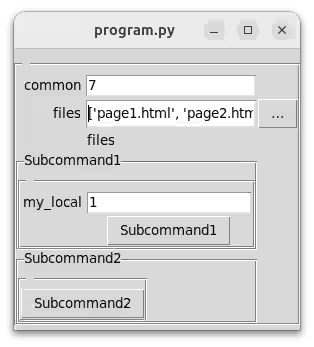
As you see, thanks to SubcommandPlaceholder, subcommand was not chosen yet. Click to the first button.
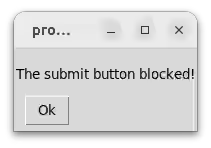
and the terminal got:
Click to the second button.
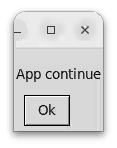
Terminal output:
Powerful automation
Note we use from tyro.conf import Positional to denote the positional argument. We did not have to write --files to put there HTML files.
init()
Just before the form appears.
As the __post_init__ method is not guaranteed to run just once (internal CLI behaviour),
you are welcome to override this method instead. You can use self.facet from within.
run()
This method is run automatically when the command is chosen. (Either directly in the CLI or by a successive dialog.)
Raises:
| Type | Description |
|---|---|
ValidationFail
|
Do repeat the form. |
SubcommandPlaceholder
Use this placeholder to choose the subcommand via a UI.