Settings
UI Settings
The UI behaviour can be modified via a settings object. It can be passed to the run function or defined through a config file. Settings defined in the config file take precedence. Every interface has its own settings object.
Passing the settings to the run method:
from mininterface.settings import MininterfaceSettings

opt = MininterfaceSettings()
run(settings=opt)
Specifying only the GuiSettings:
Specifying the GuiSettings + turning off the mnemonic for all UIs (not only gui, but also text, ...):
from mininterface.settings import MininterfaceSettings, GuiSettings, UiSettings

opt = MininterfaceSettings(
    gui=GuiSettings(combobox_since=1),
    ui=UiSettings(mnemonic=False)
)
run(settings=opt)
Specifying the settings via dataclasses is very convenient, as your IDE suggests all the available options, including their hints.
Config file special section
In a YAML config file, use the special section 'mininterface' to set up the UI. For example, this stub will force your program to use the TUI interface.
Complete example
The source of program.py – we have a single attribute foo:
from typing import Annotated
from dataclasses import dataclass
from mininterface import run, Options

@dataclass
class Env:
    foo: Annotated["str", Options("one", "two")] = "one"

m = run(Env)
m.form()
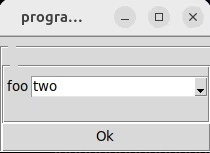
The contents of program.yaml will enforce comboboxes:
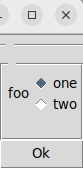
The difference when using such a configuration file:
Inheritance
The individual settings items are inherited, with the descendants having higher priority. E.g. TuiSettings works as a default for TextSettings and TextualSettings.
graph LR
GuiSettings --> UiSettings
TuiSettings  --> UiSettings
TextualSettings --> TuiSettings
TextSettings --> TuiSettings
WebSettings --> TextualSettings
E.g. this config file sets the UiSettings item mnemonic to None for TuiSettings and more specifically to False for TextSettings.
The value then varies across the interfaces this way:
| interface | mnemonic value |
|---|---|
| gui | True (the UiSettings item default) |
| textual | None |
| text | False |
The settings object
MininterfaceSettings
interface: Optional[InterfaceName] = None
Enforce an interface. By default, we choose automatically.
UiSettings
toggle_widget: str = 'f4'
Shortcut to toggle widgets like secret fields, file picker, and datetime dialog.
The shortcut should be in Textual format (e.g., "ctrl+t", "f4").
This format will be automatically converted to the appropriate format
for each interface (e.g., "
Examples:
- "ctrl+t" for Control+T
- "alt+f" for Alt+F
- "f4" for F4 key
- "cmd+s" for Command+S (macOS)
mnemonic: Optional[bool] = True
Allow users to access fields with the Alt+char shortcut.
True: All Tags withTag(mnemonic=char|True|None)will have a mnemonic enabled.False: All mnemonic is disabled, even if configured viaTag(mnemonic=char).None: All Tags withTag(mnemonic=char|True)will have a mnemonic enabled.
mnemonic_hidden: bool = False
If True, the field label is not underlined to mark the mnemonic.
GuiSettings
combobox_since: int = 10
The threshold to switch from radio buttons to a combobox.
Without combobox:
With combobox:
(Note, there must be multiple fields for combobox to appear.)
radio_select_on_focus: bool = False
Select the radio button on focus. Ex. when navigating by arrows.
TuiSettings
TextualSettings
TextSettings
mnemonic_over_number: Optional[bool] = None
Even when mnemonic can be determined, use rather number as a shortcut.
By default if None, determine those with Tag(mnemonic=char|True):
If True, determine also those having Tag(mnemonic=None):
If False, we prefer numbers:
The original code:
from dataclasses import dataclass
from typing import Annotated
from mininterface import Tag, run
from mininterface.settings import MininterfaceSettings, TextSettings


@dataclass
class Env:
    foo1: bool = False
    foo2: bool = False
    foo3: Annotated[bool, Tag(mnemonic="g")] = False


m = run(Env, settings=MininterfaceSettings(text=TextSettings(mnemonic_over_number=True)))
m.form()
quit()
plain_menu: bool = False
Use a plain numbered list read by input() instead of the interactive arrow-key menu.
The interactive menu (simple-term-menu) redraws the screen with escape sequences, which does not work on Windows and plays badly with dumb terminals, logged sessions or screen readers. The plain menu is also used automatically whenever the interactive menu is not available.
WebSettings
CliSettings
omit_arg_prefixes: bool = False
Simplify argument names by removing parent field prefixes from flags.
$ ./program.py --help
# omit_arg_prefixes = False
usage: program.py [-h] [-v] --arg.subarg.text STR
# omit_arg_prefixes = True
usage: program.py [-h] [-v] --text STR
Code
See: https://brentyi.github.io/tyro/api/tyro/conf/#tyro.conf.OmitArgPrefixes
omit_subcommand_prefixes: bool = False
Simplify subcommand names by removing parent field prefixes from subcommands.
$ ./program.py --help
# omit_subcommand_prefixes = False
usage: program.py [-h] [-v] {subcommand:message,subcommand:console}
# omit_subcommand_prefixes = True
usage: program.py [-h] [-v] {message,console}
Code
See: https://brentyi.github.io/tyro/api/tyro/conf/#tyro.conf.OmitSubcommandPrefixes
disallow_none: bool = False
Disallow passing None in via the command-line interface for union types containing None.
$ ./program.py --help
# disallow_none = False
usage: program.py [-h] [-v] [--field {None}|INT]
# disallow_none = True
usage: program.py [-h] [-v] [--field INT]
Code
See: https://brentyi.github.io/tyro/api/tyro/conf/#tyro.conf.DisallowNone
flag_create_pairs_off: bool = False
Disable creation of matching flag pairs for boolean types.
$ ./program.py --help
# flag_create_pairs_off = False
usage: program.py [-h] [-v] [--foo | --no-foo]
# flag_create_pairs_off = True
usage: program.py [-h] [-v] [--foo]
Code
See: https://brentyi.github.io/tyro/api/tyro/conf/#tyro.conf.FlagCreatePairsOff