Supported types
Various types are supported:
- scalars
- functions
- enums
- well-known objects (
Path,datetime) - iterables (like
list[Path]) - custom classes (somewhat)
- union types (like
int | None) - nested dataclasses
- union of nested dataclasses for subcommands
Basic usage
Usage in a dataclass
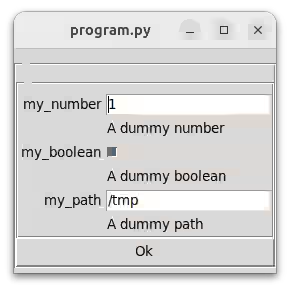
Take a look at how it works with variables organized in a dataclass:
from dataclasses import dataclass
from pathlib import Path

from mininterface import run


@dataclass
class Env:
    my_number: int = 1
    """ A dummy number """
    my_boolean: bool = True
    """ A dummy boolean """
    my_conditional_number: int | None = None
    """ A number that can be null if left empty """
    my_path: Path = Path("/tmp")
    """ A dummy path """


m = run(Env)  # m.env contains an Env instance
m.form()  # Prompt a dialog; m.form() without parameter edits m.env
print(m.env)
# Env(my_number=1, my_boolean=True, my_path=PosixPath('/tmp'),
#  my_point=<__main__.Point object at 0x7ecb5427fdd0>)
Usage in a dict
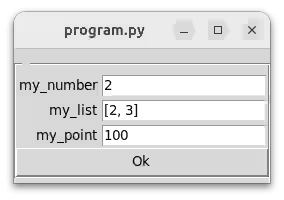
Variables organized in a dict:
Besides scalar types, there is (basic) support for common iterables and custom classes.
from mininterface import run

class Point:
    def __init__(self, i: int):
        self.i = i

    def __str__(self):
        return str(self.i)


values = {"my_number": 1,
          "my_list": [1, 2, 3],
          "my_point": Point(10)
          }

m = run()
m.form(values)  # Prompt a dialog
print(values)  # {'my_number': 2, 'my_list': [2, 3], 'my_point': <__main__.Point object...>}
print(values["my_point"].i)  # 100
Examples
All the examples need some imports:
Scalars
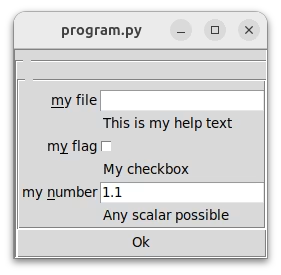
@dataclass
class Env:
    my_file: str
    """ This is my help text """

    my_flag: bool = False
    """ My checkbox """

    my_number: float = 1.1
    """ Any scalar possible """

run(Env).form()
Functions
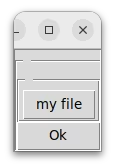
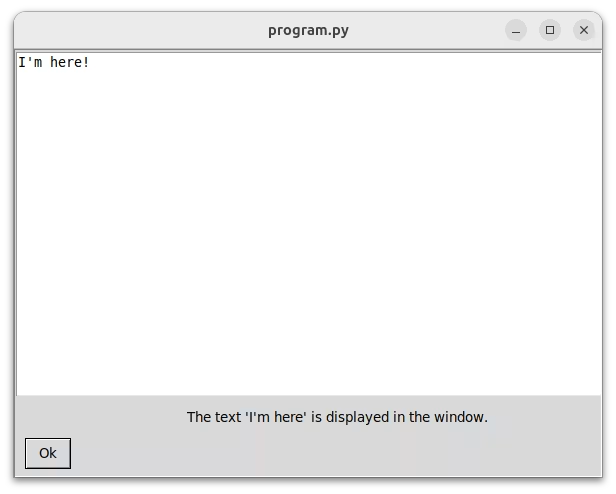
Functions appear as buttons.
def my_callback():
    print("I'm here!")

@dataclass
class Env:
    my_file: Callable = my_callback

run(Env).form()
Or use the with statement to redirect the stdout into the mininterface.
Warning
When used in a form like this m.form({'My callback': my_callback}), the value is left intact. It still points to the function. This behaviour might be reconsidered and changed. (It might make more sense to change it to the return value instead.)
Constraining
To constrain a value, either pass an enum object or a typing.Literal, or use the handy additional type SelectTag that might speed you up a bit.
See the OptionsType help for all the possibilities; here is just a quick hint:
Enums
The CLI shows keys, the UI shows values. The values are static. The program:
The CLI shows keys.
$ ./program.py --help
usage: program.py [-h] [-v] --val {RED,GREEN}

╭─ options ───────────────────────────────────────────────────────────────────────╮
│ -h, --help              show this help message and exit                         │
│ -v, --verbose           verbosity level, can be used multiple times to increase │
│ --val {RED,GREEN}       (required)                                              │
╰─────────────────────────────────────────────────────────────────────────────────╯
(Note: You may mark it with a special flag to show the values in the CLI.)
The UI shows values:
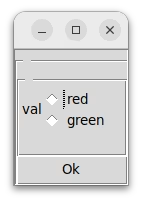
As both keys and values are displayed, should you need to carry additional information, displayed neither in the CLI nor in the UI, you can tweak the Enum class.
class Color(Enum):
    RED = "#ff0000"
    GREEN = "#00ff00"

    def __init__(self, payload):
        # mark '#ff0000' as payload, rather than the `.value`
        self.payload = payload

    @property
    def value(self):  # `.value` is seen from UI
        return self.name.lower()

@dataclass
class Env:
    val: Color

m = run(Env)
print(m.env.val.payload)  # ex. '#ff0000'
Literal
The built-in Literal is supported and allows a one-liner.
from typing import Literal

@dataclass
class Env:
    val: Literal["one", "two"]

m = run(Env)
print(m.env.val)  # ex. 'one'
Should you need dynamic values, wrap it in Annotated:
from typing import Annotated, Literal

variable = "one", "two"

@dataclass
class Env:
    val: Annotated[str, Literal[variable]] = "one"

m = run(Env)
print(m.env.val)  # ex. 'one'
SelectTag
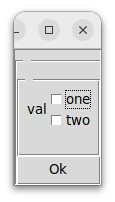
Advanced adjustments, multiple choice, dynamic values, etc.
@dataclass
class Env:
    val: Annotated[list[str], SelectTag(options=["one", "two"], multiple=True)]

run(Env)
Dataclass (→ subgroup)
You can nest the classes to create a subgroup:
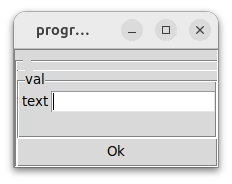
In the config file, it behaves like a dict:
Dataclasses union (→ subcommand)
You can union the classes to create subcommands:
Use a plain dataclass
Unionto group config/data under subcommands (you read the chosen one off.envand act on it yourself). SubclassCommandand implementrun()when each subcommand has behavior you want dispatched automatically.
from typing import Literal

@dataclass
class ConsolePlain:
    pass

@dataclass
class ConsoleRich:
    color: Literal["red", "green"]

@dataclass
class Console:
    style: ConsolePlain | ConsoleRich
    bot_id: Literal["id-one", "id-two"]

@dataclass
class Message:
    text: str

@dataclass
class Env:
    val: Message | Console

m = run(Env)
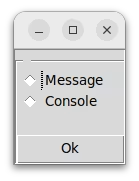
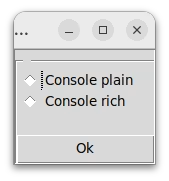
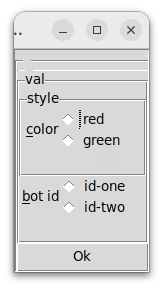
First, we've chosen Console, then Console rich.
Grouping
Note that the fields from the outer Console and the inner ConsoleRich are displayed together in step 3. Why? You might start at an arbitrary position.
Starting at step 1:
Starting at step 2:
$ ./program.py console --help
usage: program.py console [-h] [-v] --bot-id {id-one,id-two} {console-plain,console-rich}
$ ./program.py console
That way, you may start anywhere in the CLI and still be sure that all the missing fields are, if possible, grouped into a single form dialog.
Shorter CLI notation
This is how it looks in the CLI:
Is that too long for you? Instead of plain Env, use the settings:
from mininterface.settings import CliSettings
m = run(Env, settings=CliSettings(omit_subcommand_prefixes=True))
In the background, it does the same thing as applying an annotation marker from the underlying CLI library tyro.
Take a look! Using that annotation makes the usage line shorter.
In the config file, put a dict with the subcommands in kebab-case. Here, we define some config defaults for ConsoleRich, leaving Message and ConsolePlain without config defaults.
Well-known objects
We've added extra functionality for well-known objects like Path or datetime (file existence check etc.); see the Tag subclasses in the Custom types section (PathTag, DatetimeTag, ...).
Iterables
from pathlib import Path

@dataclass
class Env:
    my_file: list[int] = field(default_factory=lambda: [1, 2, 3])
    my_paths: list[Path] = field(default_factory=lambda: [])
run(Env).form()
Union types
An enormously useful feature: letting the user leave a variable unset.
Additional
We've added some other useful custom types that can be imported mostly from mininterface.tag.
- Tag subclasses – The descendants of the
Tag, the object for storing values. Normally, you don't need to use or know much about those but they can be helpful when you need to further specify the functionality, such as restricting aPathto directories only (PathTag). - Tag aliases – Useful shortcuts.
- Prepared annotations – Useful types to be used for nifty CLI parsing.