All possible interfaces
Apart from the default Mininterface – the base interface all the others are fully compatible with – several interfaces exist in mininterface.interfaces.
| shortcut | full name |
|---|---|
| min | Mininterface |
| gui | GuiInterface | TkInterface |
| tui | textual | TuiInterface |
| text | tui | TextInterface |
| web | WebInterface |
Ordering
We try to obtain the best interface available. The preference is gui, then tui (textual, or at least text); finally, the original non-interactive min is used. This ensures the program still works in cron jobs etc. (Web is never chosen automatically.)
graph LR
gui --> tk{ tk } --> tui --> textual{ textual } --> text{ text } --> min
web
Getting one
Normally, you get an interface through mininterface.run
but if you do not wish to parse the CLI and config file, you can invoke one directly through from mininterface.interfaces import *. You may as well use the get_interface function to ensure the interface is available, or invoke the program with the MININTERFACE_INTERFACE environment variable.
Info
Performance boost: Only the interfaces actually used are loaded into memory, for a faster start.
Direct invocation
How to invoke a specific interface directly?
from mininterface.interfaces import TuiInterface

with TuiInterface("My program") as m:
    number = m.ask("Returns number", int)
get_interface
Returns the best available interface.
Similar to mininterface.run but without CLI or config file parsing.
Parameters:
| Name | Type | Description | Default |
|---|---|---|---|
interface |
InterfaceType
|
An interface type of preference. |
None
|
title |
str
|
Window title |
''
|
settings |
Optional[MininterfaceSettings]
|
MininterfaceSettings objects |
None
|
env |
Optional[EnvClass]
|
You can specify the .env attribute of the returned object. |
None
|
Without an explicit interface, the preference is taken from the MININTERFACE_INTERFACE
environment variable, then from settings.interface.
Environment variable MININTERFACE_INTERFACE
From outside, you may override the default interface choice with the environment variable.
$ MININTERFACE_INTERFACE=web program.py
Mininterface
The base interface. It is configured via UiSettings.
Non-interactive; it behaves as if the user confirmed everything. Useful e.g. in cron scripts.
Code
from dataclasses import dataclass
from mininterface import run

@dataclass
class Env:
    """ This calculates something. """

    my_flag: bool = False
    """ This switches the functionality """

    my_number: int = 4
    """ This number is very important """

if __name__ == "__main__":
    m = run(Env, title="My application")
    m.form()
    # Attributes are suggested by the IDE
    # along with the hint text 'This number is very important'.
    print(m.env.my_number)
If that is not possible, the program ends with a warning.
$ MININTERFACE_INTERFACE=gui ./program.py
Asking the form Env(my_flag=MISSING, my_number=4)
the following arguments are required: --my-flag
Code
from dataclasses import dataclass
from mininterface import run

@dataclass
class Env:
    """ This calculates something. """

    my_flag: bool # no default value here
    """ This switches the functionality """

    my_number: int = 4
    """ This number is very important """

if __name__ == "__main__":
    m = run(Env, title="My application")
    m.form()
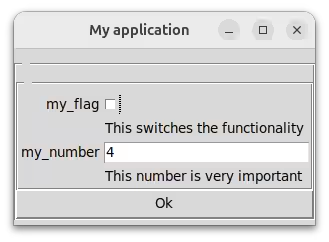
GuiInterface or TkInterface or 'gui'
A tkinter window. It is configured via GuiSettings.
TuiInterface or 'tui'
An interactive terminal. It tries to use TextualInterface, with TextInterface as a fallback. Configured via TuiSettings.
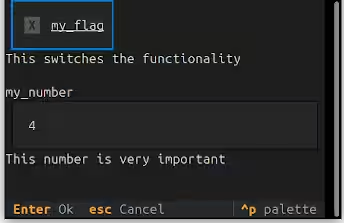
TextualInterface
If textual is installed, a rich, mouse-clickable interface is used. It is configured via TextualSettings.
TextInterface
A plain-text fallback interface with no dependencies. It is configured via TextSettings. A non-interactive session becomes interactive if possible, but there is no mouse support. Unlike TextualInterface, it does not clear the whole screen, should that suit your program flow better.

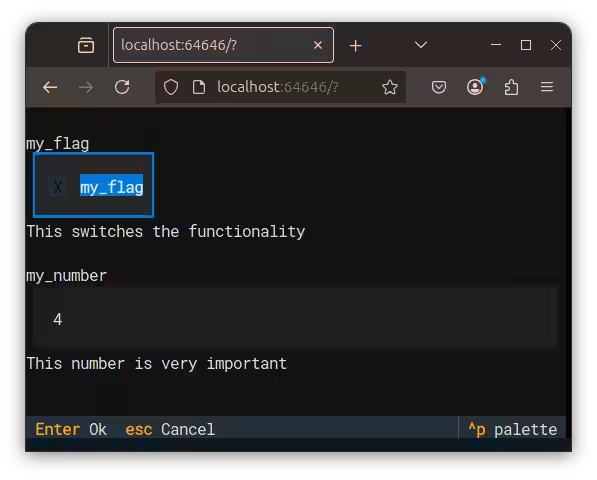
WebInterface or 'web'
Exposes the program to the web. It is configured via WebSettings.
You can expose any script to the web by invoking it through the bundled mininterface program.
Still, you can request the web interface by preference in the run or get_interface method, invoke it directly by importing WebInterface from mininterface.interfaces, or use the environment variable.
$ MININTERFACE_INTERFACE=web ./program.py
Serving './program.py' on http://localhost:64646

Press Ctrl+C to quit
Caveat
Should you plan to use the WebInterface, we recommend making its invocation the first thing your program does. All the statements before it run multiple times!
Warning
Still in beta. We appreciate help with testing etc.